
Editing Log Formats
This dialog allows the filename or header of a log file to be configured, with the ability to insert various variables into the text.
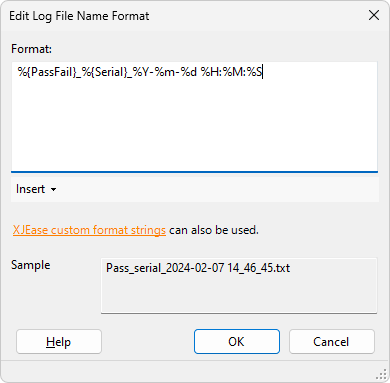
Enter the text that you want to appear in the file name or the header in the top box. Various patterns beginning with a percent sign can be inserted, which will be replaced by the appropriate values when the log file is created. Standard formats can be inserted by clicking the Insert drop-down and selecting an item:
| Item | Pattern | Description |
|---|---|---|
| Project | %{Project} | The name of the project. |
| User | %{User} | The name of the currently logged in XJRunner user or an empty string if user logins are disabled. |
| Board Serial Number | %{Serial} | The serial number of the board being tested, or an empty string if serial numbering is not enabled. |
| Long Date | A long form of the date that the log file is created on, e.g. '29 August 2011'. The exact format depends on the settings in Windows Control Panel, and will vary depending on the locale. | |
| Short Date | A short form of the date that the log file is created on, e.g. '29/8/2011'. The exact format depends on the settings in Windows Control Panel, and may vary depending on the locale. Note that underscores are substituted in place of forward slashes in the log file name. | |
| Time | %{Time} | The time that the log file is created, e.g. '13:45:01'. The exact format depends on the settings in Windows Control Panel, and may vary depending on the locale. Note that underscores are substituted in place of colons in the log file name. |
| Pass/Fail | %{PassFail} | Whether the tests for the board passed or failed or were stopped. The format is replaced by one of the strings Pass, Fail or Stopped. |
| XJLink Serial Number | %{XJLinkSerial} | The serial number of the XJLink that runs the test. |
| XJLink Name | %{XJLinkName} | The name of the XJLink that runs the test. |
In addition to these formats, any format that is valid in an XJEase FORMAT function for formatting dates and times is valid (see example below).
Invalid characters in filenames
Operating systems have limitations on the characters that are allowed in a filename. When configuring the text for a filename, invalid characters are replaced by underscores.
On Windows, the list of invalid characters is:
- Control characters (ASCII 0x00 to 0x1F inclusive)
:(colon)*(star)?(question mark)\(back slash)/(forward slash)
On Linux, the list of invalid characters is:
nul(ASCII 0x00)/(forward slash)
Example
This example filename format:
%{Serial}_%Y-%m-%d %H:%M:%S Production Log
produces a filename of the form XY000124_2017-08-29 15_34_12 Production Log.txt on Windows.
See Also
XJTAG v4.4.0