
Configuring and using the Fault Dictionary
When using XJRunner, or the  Run Tests screen of XJDeveloper to test products in volume, you are likely to find over time that there are certain common fault conditions that require known remedial action. In order to reduce repair time, you can configure a Fault Dictionary in your XJTAG system to recognise these fault conditions and display a message describing the required repair, or additional tests that should be performed.
The fault conditions that trigger the Fault Dictionary may be as simple as a single test returning a particular value, or can be a combination of results returned from several different tests.
In most cases test functions will return zero to represent a pass, and one to represent a fail. However any non-zero value is interpreted as a fail by XJRunner so you can write your tests to return different values for different failure modes. These values can then be used to control which Fault Dictionary entry is displayed.
In this exercise you are going to configure entries in the Fault Dictionary for fault conditions related to some of the I2C tests on the XJDemo board. The exercise is based on the XJTAG project for the XJDemo v4 board that is generated by completing the XJDeveloper Tutorial. The exercise starts with a project installed as a zip file: CompletedTutorial4.zip, based on the completed tutorial project.
- Extract the zip file CompletedTutorial4.zip to a new, empty directory of your choice.
- Navigate to the Board Test directory.
- Using XJDeveloper open XJDemo Board.xjd from the extracted files.
The faults that will be used to trigger the different entries in the Fault Dictionary use the SDA signal of the I2C bus connected to the ADC and the EEPROM. This signal can be accessed from two sources: a JTAG-enabled pin, U1.5, and directly from the XJLink via a PIO pin that is connected to P1.8.
The SDA net is made of two parts, joined by one of the jumpers on the Fault Creation connector FCJ1. Another jumper on this connector is able to short the net to the GND net.
Shorting the SDA net to GND will not be detected by Connection Test, because the SDA net is not included in that test, due to a Disable Value in two Test Device Files used for categorising the devices on this net. However this condition will cause test failures for both I2C devices using the net.
Removing the jumper that joins the two halves of the net, however, will only make the EEPROM test fail, because removing the link separates the EEPROM from the JTAG pin and the XJLink PIO pin which are on the other half of the net. The ADC, however remains linked to the JTAG pin and the XJLink PIO pin.
Because this exercise focuses on using the SDA signal of the I2C bus, only tests that drive that bus need to be enabled.
- Click the
 XJRunner Setup screen button under Run and Deploy.
 - Click the
 None button at the bottom of the test list to clear the selection.
 - Re-enable the relevant tests by clicking the cross next to U5.Test and U11.Test. The cross will change to a tick icon
 to indicate that these tests are set to run by default.
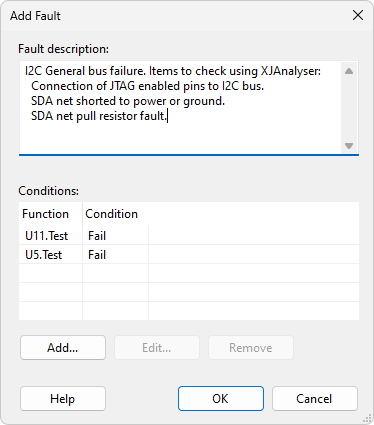
The next step is to create the entries in the Fault Dictionary. The first entry will be displayed if the tests on both I2C devices on a bus fail their tests.
- Staying on the XJRunner Setup screen, click on the Fault Dictionary tab in the Settings area.
- Select the Add... button to open the Add Fault dialog.
- Click the Add... button to allow you to enter the actual fault conditions which will trigger output.
- From the test list in the Add/Edit Fault Condition pop-up window, select the test function for U11 under ADC Tests, and set the condition to Fail.
- Select the OK button.
- Select the Add button again to enter another condition. This time select the test function for U5 under EEPROM Tests, and set the condition to Fail.
- Click OK.
- Copy the text from the grey box below and paste it into the Fault Description text box:
- Select the OK button to close the window.
I2C General bus failure. Items to check using XJAnalyser:
  Connection of JTAG enabled pins to I2C bus.
  SDA net shorted to power or ground.
  SDA net pull resistor fault.
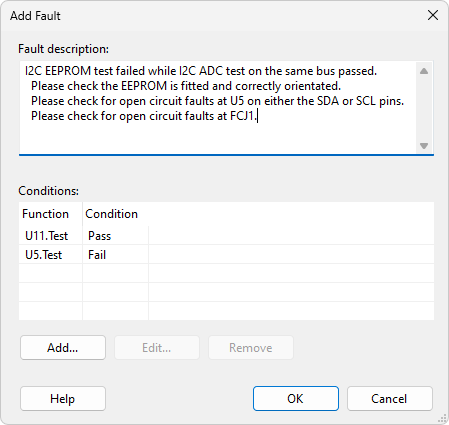
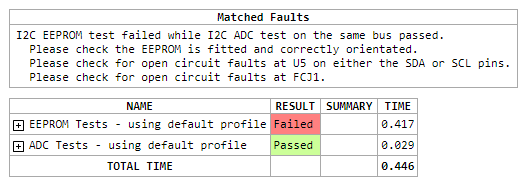
The second Fault Dictionary entry will be displayed if the EEPROM test fails and the ADC test passes.
- Select the Add... button to configure the conditions which will trigger the Fault Dictionary to display a different message.
- Click the Add... button to enter a new entry to the Fault Dictionary.
- From the Test List in the Add/Edit Fault Condition window, select the test function for U11 under ADC Tests, and set the condition to Pass.
- Select the OK button.
- Select the Add... button again to enter another condition. This time select the test function for U5 under EEPROM Tests, and set the condition to Fail.
- Click OK.
- Copy the text below and paste it into the Fault Description window:
- Select the OK button to close the window.
I2C EEPROM test failed while I2C ADC test on the same bus passed.
  Please check the EEPROM is fitted and correctly orientated.
  Please check for open circuit faults at U5 on either the SDA or SCL pins.
  Please check for open circuit faults at FCJ1.
In order to see XJTAG emit these Fault Dictionary entries the next step is to use the links on FCJ1 to cause faults, and then run the selected tests on the Run Tests screen.
- Click on the
 Save button on the main XJDeveloper toolbar.
 - Go to the Run Tests screen in XJDeveloper, in the Run and Deploy section.
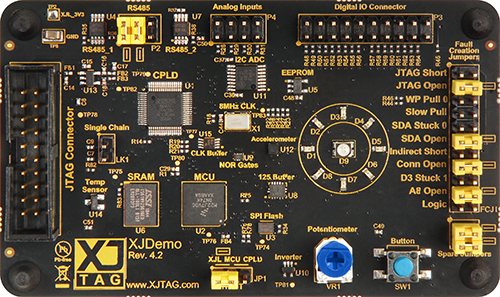
- Use one of the spare jumpers on the XJDemo board to create the fault marked as SDA Stuck 0 on FCJ1 - see picture.
- Click the
 Run button.
The test output shows that the tests for both devices (U11 and U5) have failed. This fault condition has caused the Fault Dictionary to show the message that there is a general failure on the bus.
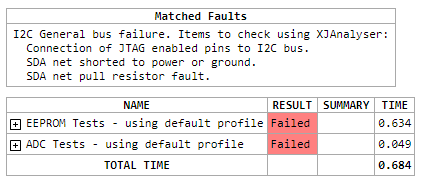
By changing the links on FCJ1, you can make U5 fail individually, which will cause the Fault Dictionary to show the other message.
- Remove the jumper from the SDA Stuck 0 location in FCJ1 to fix the previous fault.
- Also remove the jumper marked SDA Open from FCJ1 to create the new fault.
- Click the Run button.
This time only the test on U5 has failed so the Fault Dictionary is suggesting the operator checks U5 (the EEPROM).
- Replace the jumpers on the XJDemo board back in their original positions.
This exercise has given you an example of how to set up conditions to tell operators what actions to take when a specific combination of faults occurs, which can be useful both for diagnosing faults based on a combination of errors, or reminding operators of how they should handle specific failures.
The fault dictionary can be edited in both XJDeveloper and, subject to having sufficient user privilege, in XJRunner.
See Also
XJTAG v4.2.5