
Files Options
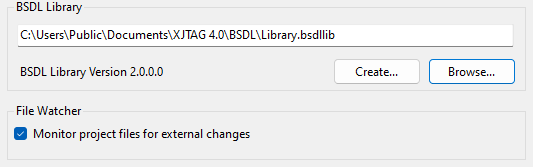
BSDL Library
This text entry box allows you to specify the path to the BSDL library to be used by XJAnalyser. This library acts as an index of available BSDL files enabling the correct BSDL file to be automatically found using the IDCODE of the device on your board. Either type a path or click Browse... to display a dialog to allow a file to be selected. The version of the library selected is displayed. Alternatively, click Create... to create a new library.
File Watcher
If checked XJAnalyser will monitor project files for external changes, and notify the user when any modifications are detected by displaying a Files Modified dialog. This dialog lists all of the modified files, and provides the option of refreshing the project. Selecting Yes updates the project to incorporate any file changes, while selecting No leaves the project unaltered.
XJTAG v4.2.5