
Dealing with Profiles in Variants
- The root project must contain all the profiles required by the variants because a new profile cannot be created in a variant.
All the profiles that have been defined are listed at the top of the Variant Details pane:
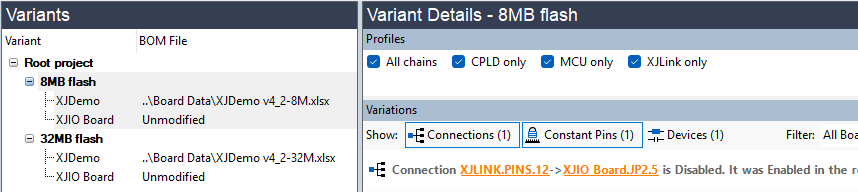
Figure 20: Selecting Profiles that a Variant can use
If a JTAG device is unavailable in a variant, some profiles may no longer be possible for that variant. In those situations, it is necessary to disable the relevant profile(s). To disable a profile in a variant, select the variant in the left pane and remove the tick from the relevant checkbox as shown in Figure 20 above.
- Because the root project must include all the profiles required by the variants, it is possible that some of those profiles may not be usable in the root project. In this situation, select the root project and remove the tick from the checkbox for those profiles, leaving selected only the ones that are valid for that project.
If a profile used by a test group is unavailable in a variant, the test list will need updating to change which profile the variant uses for that group. See the section on Setting Up a Test List for details of how to do this.
XJTAG v4.3.1