
Bulk XJLink Licensing
In some cases, if you buy multiple systems from XJTAG at the same time, XJTAG may supply the licences for the units in a .txt file. The format is documented below. The  Bulk Licensing... button in the XJLink manager's main window launches the Setup Bulk XJLink Licensing dialog, allows you to load into the XJLink manager and then licence the XJLink units automatically as they are plugged into the PC.
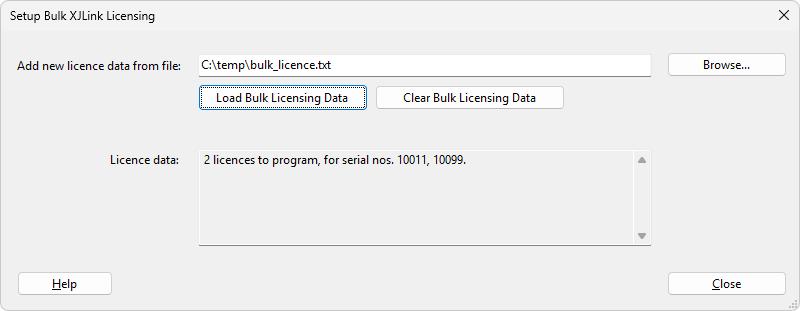
To use this feature:
- First close your main XJTAG applications (XJDeveloper, XJRunner etc) and unplug all XJLink units from your PC.
- Use the Browse... button to locate the licence file on disk.
- Click Load Bulk Licensing Data. The licences will be loaded and the Licence data panel will show how many licences have been imported. Check that this is the expected number.
- Plug an XJLink that needs licensing into the PC. XJLink Manager will recognise that it has a licence for the unit and apply it. While the licence is being applied a pop-up will ask you to wait while the XJlink is configured. When the operation has finished, unplug the unit and plug the next unit in.
- Repeat until all units have been licensed. The Licence data panel will then show that no licences remain.
The licences that have been loaded will be applied to XJLinks that are plugged in while the XJLink Manager main window remains open. If you close the window and re-open it, licensing can be resumed. However if you exit the XJLink Manager application the bulk licensing data (including how many licences remain) is not stored.
Licences are applied when an XJLink is plugged in, so if it is plugged in before licences are loaded you will need to unplug it and plug it in again.
Only one licence can be applied per XJLink using this mechanism. Loading multiple files will add the data from the files together. If licences for the same XJLink are in multiple files, the licence from the last loaded file will be used.
If you wish to stop the XJLink manager from programming XJLinks you can either use the Clear Bulk Licensing Data button to delete the data, or close the main XJLink Manager window to temporarily stop programming.
Bulk licence text file format
The file is an ASCII text file, with a .txt extension. The file contains one XJLink licence per line. Each line contains the serial number of the XJLink, a colon and then the authorisation code. Any whitespace within a line is ignored, and any lines that are not in the required format are discarded.
XJTAG v4.3.1