
XJRunner Test List
The Test List is a set of tests that together test your board entirely. A test list consists of a set of Test Groups, each of which contains one or more Test Functions.
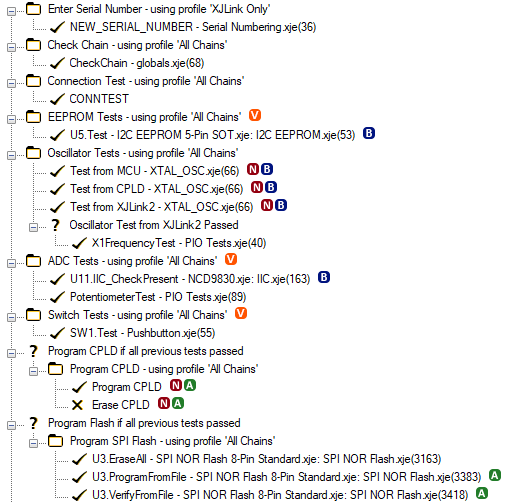
Conditional Running
It is also possible to have conditions in the test list represented by a question mark icon  . A condition can either appear at the top level and contain one of more test groups or may appear inside a group and contain one or more functions. The condition contains an expression that is evaluated at runtime to decide whether the tests it contains should be run or not.
Default Tests
Each group or function can be selected to run by default or not. Unselected items are still displayed and can be selected when running tests either on the Run Tests screen in XJDeveloper, or by an enhanced user in XJRunner. In these contexts, the default test selection can be modified and groups and functions selected or unselected. It is also possible to loop a group of function multiple times and to loop the whole test list.
Test List Annotations
Test groups and functions can show a variety of annotation icons to flag up extra information. Hovering over any of these icons with the mouse will provide a tooltip with more detail. The following annotations are possible:
 This indicates a test function has one or more input arguments. Input arguments to a test function can be set in the Arguments tab of the Edit Test Function dialog.
 This indicates a test function has had its bus access configured. See the Bus Access tab of the Edit Test Function dialog for more information.
 This indicates a test function has been renamed.
 This indicates a test group has different behaviour in different variants of the project. Hover over the icon with the mouse to see a list of the variants this test group will run in and which profiles they use. See the Variant-Profile Mapping dialog for more information about how the test list interacts with variants.
See Also
XJTAG v4.2.5