
Categories Panel
This panel displays the directory structure of the library project that is currently open. Categories can be added, removed, deleted and renamed within the XJEase Library Editor. Alternatively, if the library project's subdirectories are reorganised externally, the categories tree will automatically update correspondingly.
Files can be dragged onto categories from the file list and from disk. Dragging files from disk will copy these files into the category's corresponding directory. Dragging files within the editor will move the files and any associated history and parts files into the category.
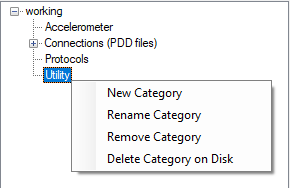
Context Menu
- Adding Categories
- Renaming Categories
- Removing Categories
- Deleting Categories
New categories can be created by right clicking on their parent category and selecting 'New Category'.
Categories can be renamed by right-clicking and selecting 'Rename Category'.
Categories can be removed from the project by right-clicking and selecting 'Remove Category'. This will remove all contained files and subdirectories from the project.
Categories can be deleted by right-clicking and selecting 'Delete Category on Disk'. This will delete the category and all its contents on disk and remove the category from the project.
Missing Categories
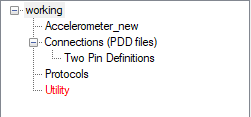
When a category's corresponding directory is missing from the project directory its name will be highlighted in red in the categories tree.
If the contained files are no longer required, the category can be removed from the library project by right-clicking on the highlighted category and selecting 'Remove Category'.
XJTAG v4.2.5