
Setting up the Test List
A test list only exists in the root project and must therefore include all the tests used by the variants, even if they are not applicable to the root. Once the variants have been defined, the test list will probably need updating to tell XJDeveloper which tests to run in each variant. For example, if device U12 isn't fitted in Variant A, the software will need to be told to exclude U12's test when running that variant.
This can either be done by restricting test groups to certain variants, or by using conditions to disable particular tests in a variant. These two methods are described below.
Restricting Test Groups to Particular Variants
A test group can be set to run only in certain variants by editing it on the  XJRunner Setup screen: double-click on the test group to open the Edit Test Group dialog and click either the Select Variants... button (Figure 28) or the Select Profiles... button (Figure 29). Which button is present will depend on whether profiles are in use in the project.
If profiles aren't used, this will open the Variant Selection dialog. To disable the test group in a particular variant, remove the tick from the relevant checkbox:
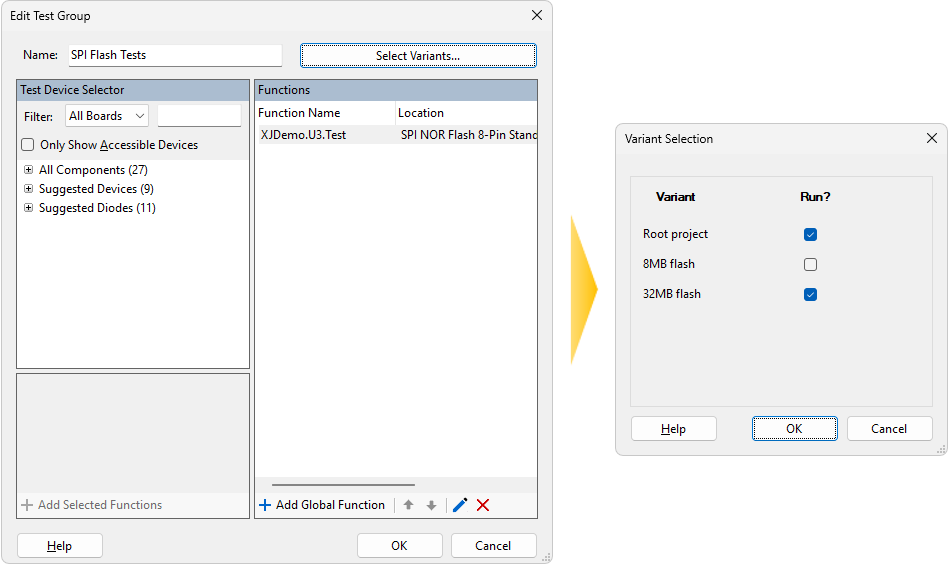
Figure 28: Disabling a Test for a Variant Without Profiles
When the project uses profiles, clicking Select Profiles... will open the Variant-Profile Mapping dialog instead. To disable the test in a particular variant, select Do not run from its dropdown menu:
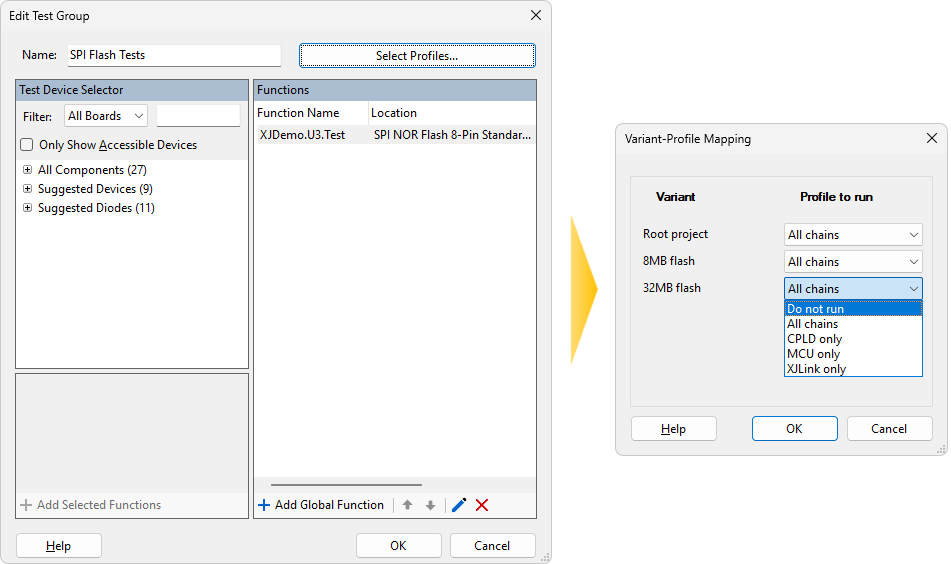
Figure 29: Disabling a Test for a Variant When Profiles are in Use
- If a test group contains some tests that will run in all variants and some that won't, you will need to ensure tests that won't always run can be disabled independently of others in the group. This can be done either by moving them into their own test group(s) or by applying conditions so that they only run in appropriate variants.
To update multiple test groups simultaneously, select them all in the test list and click Edit..., which will take you directly to the Variant-Profile Mapping dialog.
When the profile used for a test group differs between the root project and a variant, a  symbol will be placed alongside the relevant test group. Hovering the mouse over the symbol will display a tool tip that shows in which variants the test group runs, and what profiles are being used:
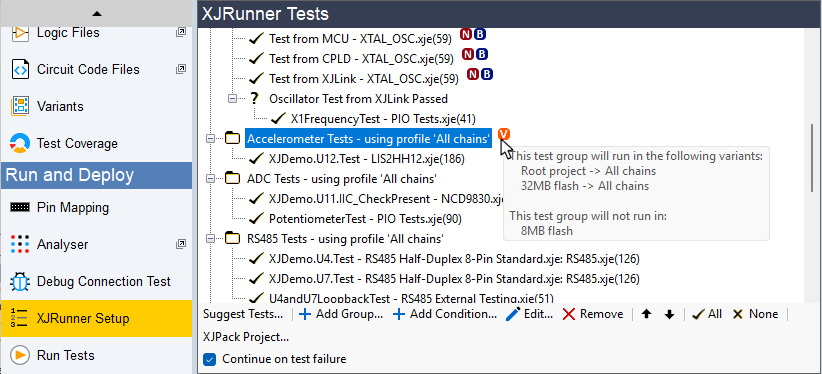
Figure 30: The Test List Shows Which Groups Have Differences for Variants
- A test group that is disabled for a particular variant using the Variant Selection or Variant-Profile Mapping dialog will remain visible in the XJRunner Setup screen. However, it will be omitted from that variant's test list on the Run Tests screen and in XJRunner / XJInvestigator.
- Disabling a test or test group by clicking on a tick or folder icon on the XJRunner Setup screen's test list will disable it for all variants.
Using Conditions
A condition can be added to a test (or test group) to control when it runs. This can be used to prevent an individual test running in the root or a variant rather than having to disable the complete group. For example, using the expression VARIANT_NAME= "VariantB" will result in the test only running in VariantB. For guidance on using expressions in this way, refer to the relevant section in the user guide on Test Lists and XJRunner Settings.
Working with Log Files
The name of the variant being run can be added to the log file's name or header by inserting the global variable VARIANT_NAME. For guidance on using log files, refer to the relevant section in the user guide on Test Lists and XJRunner Settings.
Managing Profiles
When a variant is created, XJDeveloper will assume tests will use the same profiles as the root project. If a profile is not available in the variant, the profile set for the test group must be changed.
Edit the affected test group in XJDeveloper's XJRunner Setup screen and click the Select Profiles... button (Figure 31 below). This will open the Variant-Profile Mapping dialog, in which the profile to use for the different projects can be selected:
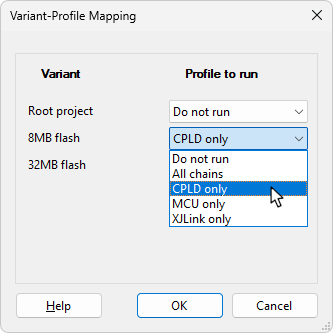
Figure 31: Changing the Profile Used by a Test Group
- If a non-variant project uses dynamic chains, the test list will describe the profile being used as the default profile rather than using its name (unless the group has been configured to use a specific profile). However, as soon as a variant is created, any test groups using the default profile will automatically be updated to refer to the profile by its explicit name rather than by default profile. As a result, if the root's default profile is subsequently changed, the profiles used in the variants will not be updated (because they are running in specifically named profiles).
XJTAG v4.3.1