
Add/Edit Filter Dialog
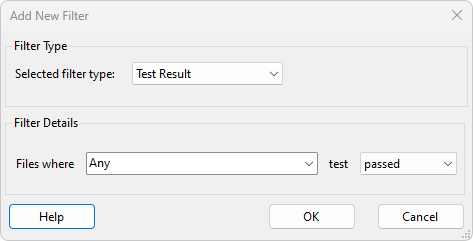
The Add/Edit Filter Dialog is used to add new, or edit existing formatted log file filters.
The filter type is selected using the Selected filter type combobox. There are currently six types of filter available:
- Test Result - filters based on the result of either a chosen test or any test.
- Test Group Result - filters based on the result of any test within either a chosen test group or any test group.
- Project Path - filters based on the project path from the formatted log files.
- Start Time - filters based on a range of allowed test run start dates and times.
- XJPack Version - filters based on the version of the XJPack file used during the test runs.
- XJTAG Version - filters based on the version of the XJTAG software used to run the tests.
- Variant - filters based on the project variant used during the test runs. The Root project variant will also match to any test runs from projects where no variants were defined.
The selection options available in the Filter Details panel will update to reflect the currently selected filter type. These options are populated with details extracted from all of the formatted log files in the File List. For example, the full list of available test names is provided when creating a Test Result filter. This process may take a while, in which case a progress bar is shown in the Filter Details panel while the relevant details are extracted.
For the Test Result and Test Group Result filters either a specific test or group may be chosen, or Any may be selected to match to any test or group with the desired result. The available results to filter for are passed, failed, skipped, stopped, ran and did not run.
All filters in the filters list must be unique; a warning message is displayed when attempting to add a filter that already exists.
XJTAG v4.2.5