
Test Coverage Options
Test coverage results can be filtered to adjust what is shown to the user, and the statistics can be shown in different ways. When comparing projects against each other you should ensure that the same settings are chosen because the selected options affect the results shown.
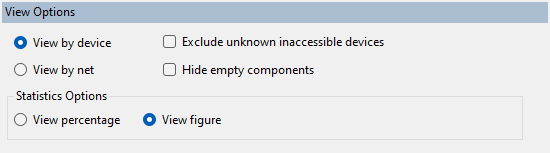
View Options
- View by device/View by net - you can choose to navigate the circuit by device or by net by selecting the corresponding radio button in this section.
- Exclude unknown inaccessible devices - there may be devices which have not been categorised as they are inaccessible by JTAG, and therefore whose pins do not have any coverage. When the circuit is viewed by device you can opt to exclude such devices from the test coverage statistics.
- Hide empty components/nets - depending on whether you are viewing statistics 'by device' or 'by net' you can choose to remove components / nets from the list of circuit elements if they do not have any pins.
- Statistics Options - by checking the corresponding button you can choose to view the test coverage statistics as percentages or as absolute numbers.
Filter Options
- Filter - the Filter box allows you to show only those items which match the filter in the displayed list of circuit elements.
- Exclude current selection from chart view - when checked the Chart View tab shows data for all of the circuit except the selected item(s) in the Summary Statistics tab.
- Filter Pins by Coverage - this section allows you to use some pre-defined filters on the list of circuit elements, based on how well their pins are tested for the various types of test coverage.
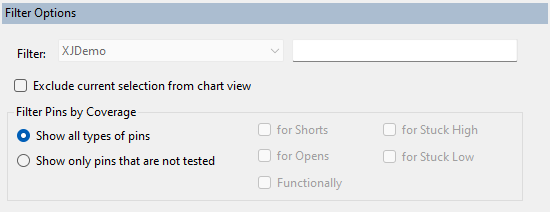
N.B. If you choose to display pins that are not tested for certain types of coverage, only pins that are not tested for any of the selected coverage types are shown.
Coverage Options
These options allow some customisation of how the test coverage statistics are calculated.
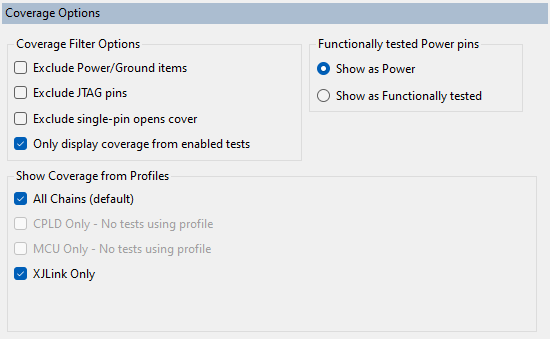
Coverage Filter Options
This section allows you to use some pre-defined filters on the list of circuit elements based on the type of pins.
- Exclude Power/Ground items - removes all power/ground pins from statistics and charts.
- Exclude JTAG pins - removes JTAG TAP pins from statistics and charts.
- Exclude single-pin opens cover - an open-circuit error on a single-pin net is meaningless (however the net can be tested for shorts) so this option allows you to decide whether you want to count this as 'untested' for opens (default) or whether since it is not possible to detect a fault you want to call this 'tested'.
- Only display coverage from enabled tests - if this is checked then coverage will be affected by the current XJRunner test list, set in the XJRunner Setup screen. The test coverage defined for a device will only be included in the overall coverage if the device's test function is in the Test List and enabled to run.
Functionally tested Power pins
It is possible for a net to be marked as both 'functionally tested' and for the net to also be a power net. This option allows you to decide how you want the statistics to count the net (it cannot count as both 'tested' and 'power' or the statistics will add up to more than 100%.)
Show Coverage from Profiles
This section only shows if the project uses multiple JTAG Chain profiles, and allows you to see which parts of the overall test coverage are contributed by tests in a particular profile or set of profiles.
XJTAG v4.2.5