
Setting Which Tests Run and the Order of Execution
The test sequence's default settings can be changed in XJDeveloper’s XJRunner Setup screen:
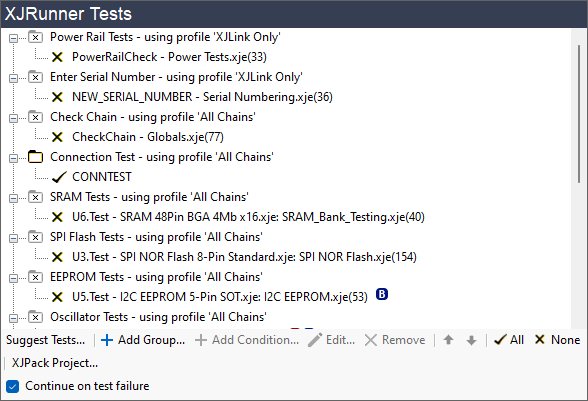
Figure 14: Adjusting the Test List
The settings defined in the XJRunner Setup screen will permanently change the project's defaults once the project is saved. They can be temporarily overridden in XJDeveloper's Run Tests screen and, if the operator has suitable permissions, in XJRunner but those changes will not persist beyond the current session.
How to Change Which Tests Run
The default for whether a test or group of tests will run or not can be set by clicking directly on the test or the folder. A tick indicates a test will run, and a cross indicates it will not run. If none of the tests in a group are set to run, the folder icon will be greyed out ( ).
).
- A quick way to select or deselect all the tests is to click Presets at the bottom of the test list (see Figure 14) and choose All or None.
How to Change the Order of Tests
The tests run in sequence from top to bottom. The order of tests within a group can be changed by dragging a test to a new position or by selecting it and using the up and down arrows at the bottom of the dialog box; tests can also be dragged between groups.
The order of groups within the list can be changed by selecting the row containing the folder icon ( or ) and dragging it to its new location or moving it using the up and down arrows at the bottom of the test list.
Continue Testing After a Test Failure
By default, testing will continue if a test fails. However, this can be changed by unchecking the Continue on test failure checkbox at the bottom of the XJRunner Tests pane:
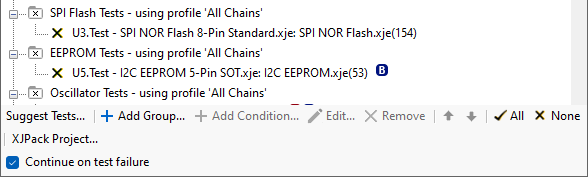
Figure 15: Allowing Tests to Continue Running After a Failure
The default set here can be overridden temporarily in XJDeveloper's Run Tests screen or when the test list is about to be run in XJRunner (if the operator has the appropriate access level).
Irrespective of how this option is set, testing will always stop if the JTAG chain is broken or if testing stops because of an XJEase run-time error.
- When a fault dictionary is in use, it is recommended that testing is allowed to continue if a fault is encountered because stopping the tests may prevent information from the dictionary being displayed.
- If conditions are being used in the test list, it is recommended that testing is allowed to continue after a failure because the additional testing could provide useful insights into the cause of the failure; the conditions can be used to prevent tests from executing that you don't want to run on a faulty board (e.g. to stop a failing board from being programmed).
XJTAG v4.2.5