
Licence Settings
The XJTAG Licence Settings will be displayed when trying to perform an action without a valid licence, and may be manually opened from the Help menu. These settings are shared across all XJTAG application and may be accessed from any application or XJLinkManager.
Hardware licensing will always be enabled and prioritised, and the Hardware Only licence method will be selected by default. Network and cloud licensing may be additionally enabled by selecting the respective licence method: if a licence cannot be provided by any plugged in hardware a licence will be obtained from the respective licence server. Note that configurations for Network and Cloud licensing will be retained even if you change to another licensing method.
Hardware Licensing
Hardware Licensing can be selected by choosing the Hardware Only licence method.
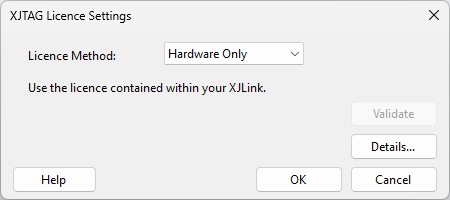
When using hardware licensing there is no configuration required. More information about the attached hardware can be found in XJLink Manager, which will be displayed when clicking the Details button. Click OK to save the configuration and close the dialog.
Network Licensing
Network Licensing can be configured by selecting the Network Licensing licence method.
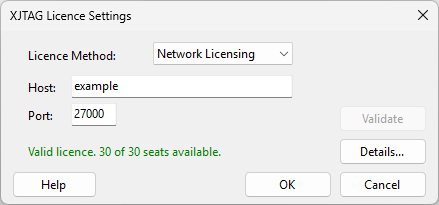
Set the Host and Port settings as specified by your network administrator. To check licence availability with the provided configuration, click Validate. To view current licence usage with the provided configuration, click Details. Click OK to save the configuration and close the dialog.
Cloud Licensing
Cloud Licensing can be configured by selecting the Cloud Licensing licence method.
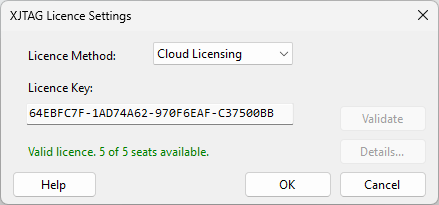
Enter the cloud licence key emailed to you after purchasing a product subscription. To check licence availability with the provided key, click Validate. Click OK to save the configuration and close the dialog.
Invalid Configuration
When the licence settings are closed via the OK button it will attempt to checkout a licence with the new configuration. If a licence is not configured, or a licence cannot be acquired with the provided configuration, a warning will be displayed.
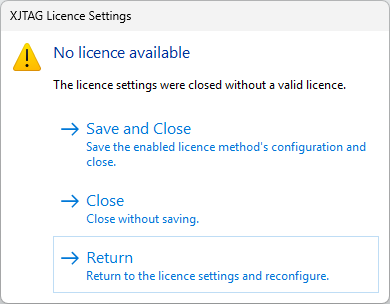
You may Return to the licence settings and reconfigure your licence, or Close the licence settings without saving. It's possible that the provided configuration is correct but a licence cannot be obtained for another reason, such as a lack of network access, so you may also Save and Close.
N.B. Only the configuration of the selected licence method will be saved.
XJTAG network licensing is managed by Flexera Software using their FlexNet Publisher (formerly called FLEXlm).
FlexNet Publisher and FLEXlm are trademarks of Flexera Software.
XJTAG v4.3.1