
Datasheet Options
XJDeveloper has the option to loosely associate a datasheet with a Test Device File. When interacting with a device whose file has been given a datasheet, options to quickly open that datasheet will be presented.
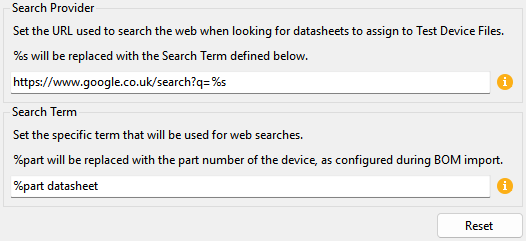
The dialog here is used to configure how the Web Search feature made available to help locate the correct datasheet for your device is executed.
Search provider
Default value: https://www.google.co.uk/search?q=%s (Google UK)
This value is the search URL of the web search you prefer to use. Such URLs may be located in your web browser's search provider settings.
%s (matching the syntax used by browsers) will be replaced with the search term configured lower down in the dialog. The final URL is escaped and passed to your system default browser.
As an example, in Microsoft Edge the URLs for search providers may be found in the settings under
Privacy, search, and services > Search and connected experiences > Address bar and search > Search engines

N.B. In this specific example, the Bing URL would need to be manually expanded to https://bing.com/search?q=%s.
The URL used does not necessarily have to be a general search engine. Various parts suppliers use similar patterns for their search functions.
Search term
Default value: %part datasheet
This setting allows for customisation of the exact term passed to the search provider. For example if you have a preferred datasheet source, you could include the name of that company in all the searches.
%part will be replaced by the Manufacturer Part Number listed in the BOM for the device. If multiple devices share the same device file, the first - ordered by reference - will be selected to look up the part number.
Reset
This button will reset any edited values to the defaults shown in the sections above.
XJTAG v4.4.0