
Create Test List Preset Dialog
The Create Test List Preset dialog allows test list presets to be added to the project. Test list presets are subsets of the test list that can all be enabled together with a handy shortcut on the Run Tests screen. For example, you might define a preset that contains only board programming functions and none of the tests, or a subset of tests that are needed for debugging a particular fault.
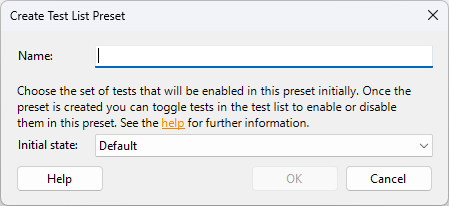
Test list presets are created by assigning them a unique name and then selecting which tests to include in the preset initially. The initial set of tests is then modified to the desired set by toggling tests on the test list after clicking OK in the dialog. This initial set can be all tests, no tests or the default set of tests. Once a custom preset is defined, it can be used as the starting point for a new preset as well.
See Also
XJTAG v4.4.0